For clubs that want to play, not do admin.

Planvra puts training, matches, pitches and changing rooms in one schedule and speaks up before two teams end up on the same grass.

UFPlanvra UF is a UF company in the Ung Företagsamhet programme.

Match formats and platforms

  • 11-a-side
  • 9-a-side
  • 7-a-side
  • 5-a-side
  • iPhone
  • Android
  • iCal / webcal
  • Browser

Introduction

What is Planvra UF?

Planvra is a scheduling and booking system for football clubs in Sweden. The club office enters pitches, teams and season. Coaches book times or apply for fixed slots on their phones. Parents and players see the schedule on an open page without logging in.

The system was built for Sturefors IF and is open to other clubs. The app is in Swedish and runs in the browser on desktop, iPhone and Android. It is developed and run by Planvra UF.

  • Pitches are split into quarters

  • Clashes are stopped before they are saved

  • The team books itself on the phone

It replaces

  • The schedule in an Excel sheet that someone has version 7 of
  • Changes in Messenger and replies by text message to the club office
  • Double bookings that are only discovered at the pitch
  • Changing rooms handed out at the last minute

How it works

From empty pitches to booked times

The club office sets the club up once. After that the teams manage their own times.

  1. Enter the pitches

    The club office enters the pitches, splits them into quarters and enters teams and season.

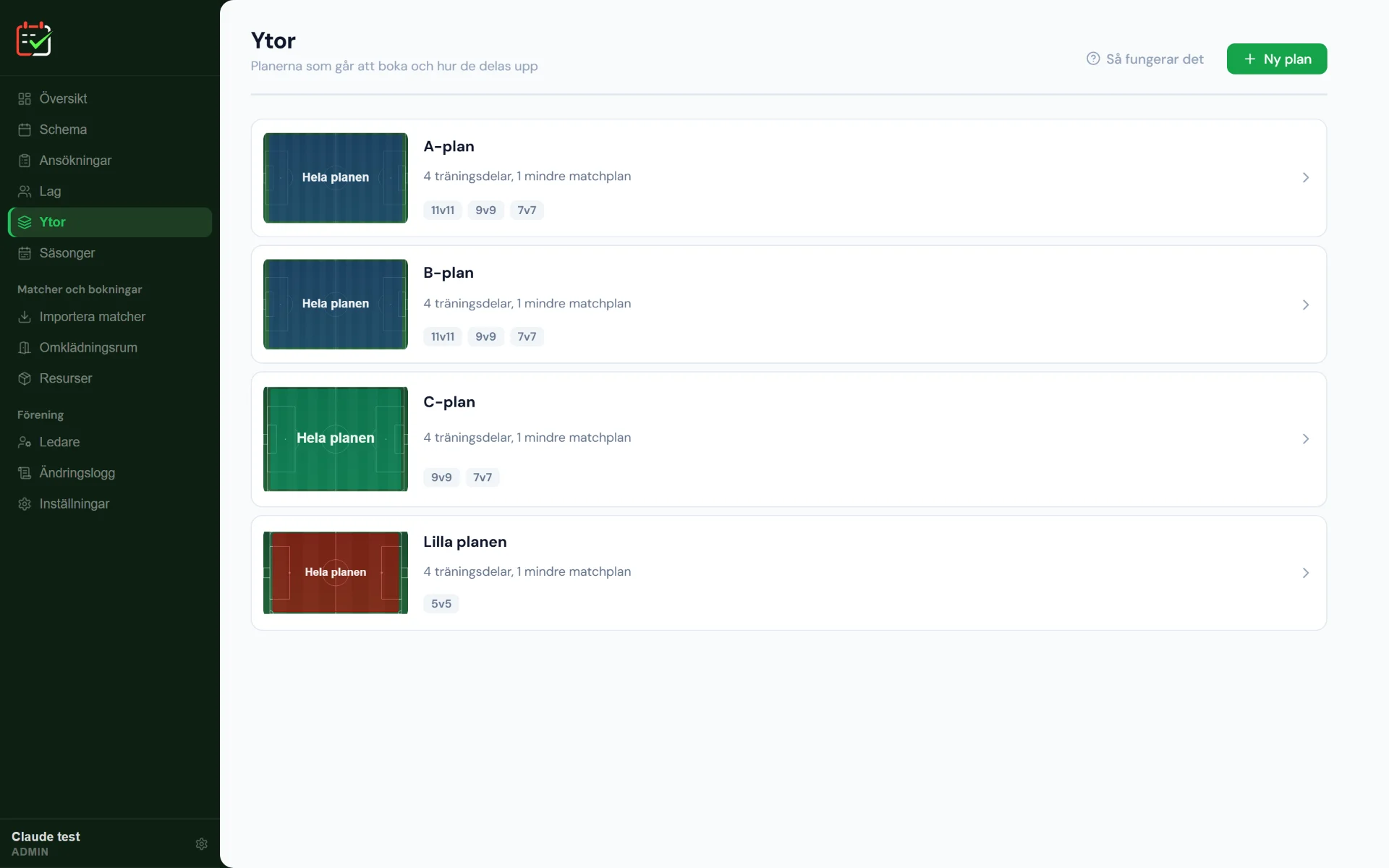
    The Areas view (“Ytor”) in Planvra: pitches A, B and C and the small pitch, each with four training sections and its match formats.
  2. Invite the coaches

    Coaches are invited with a link and connected to their team.

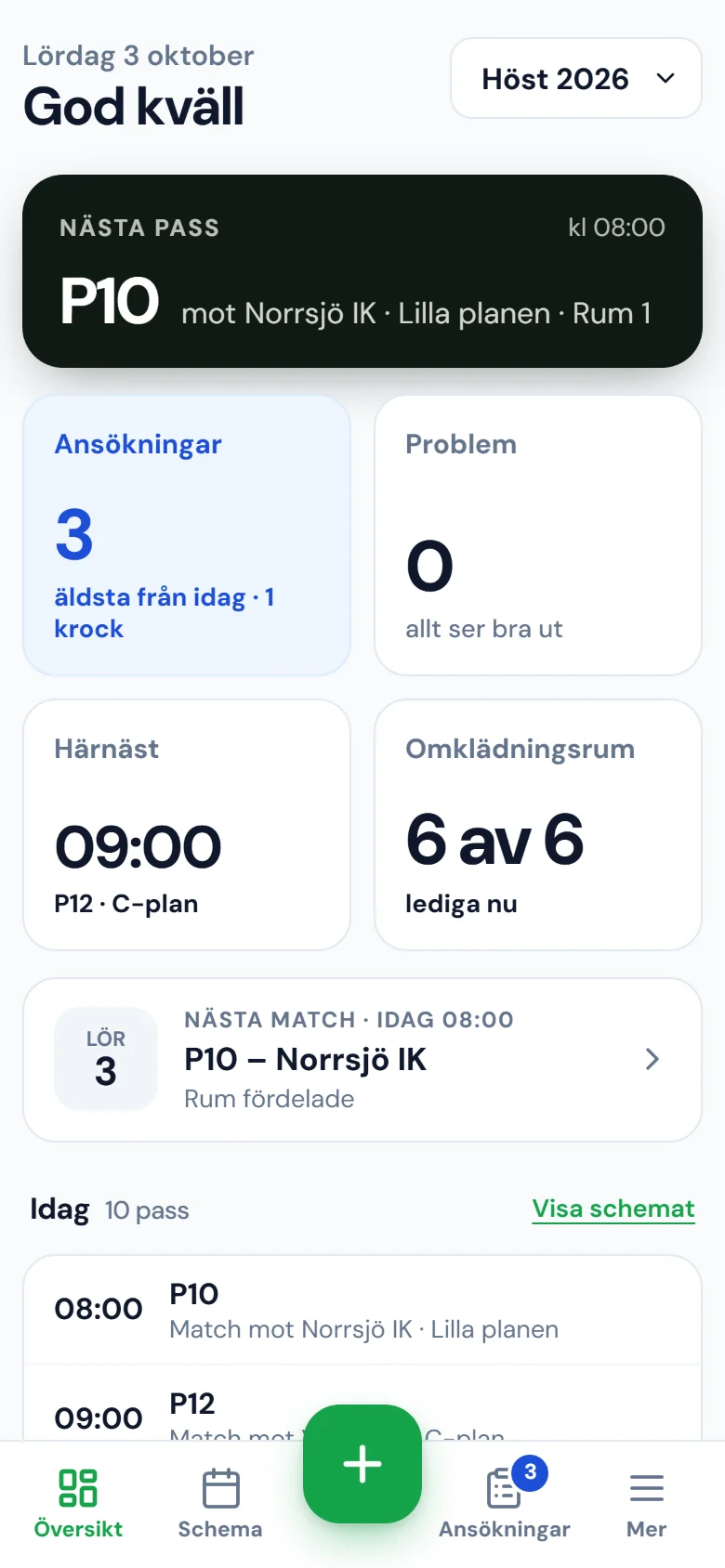
    Planvra’s overview (“Översikt”) on a phone: next session, pending applications, free changing rooms and today’s sessions.
  3. Book a time

    Free times are booked directly. Fixed slots for the season are applied for.

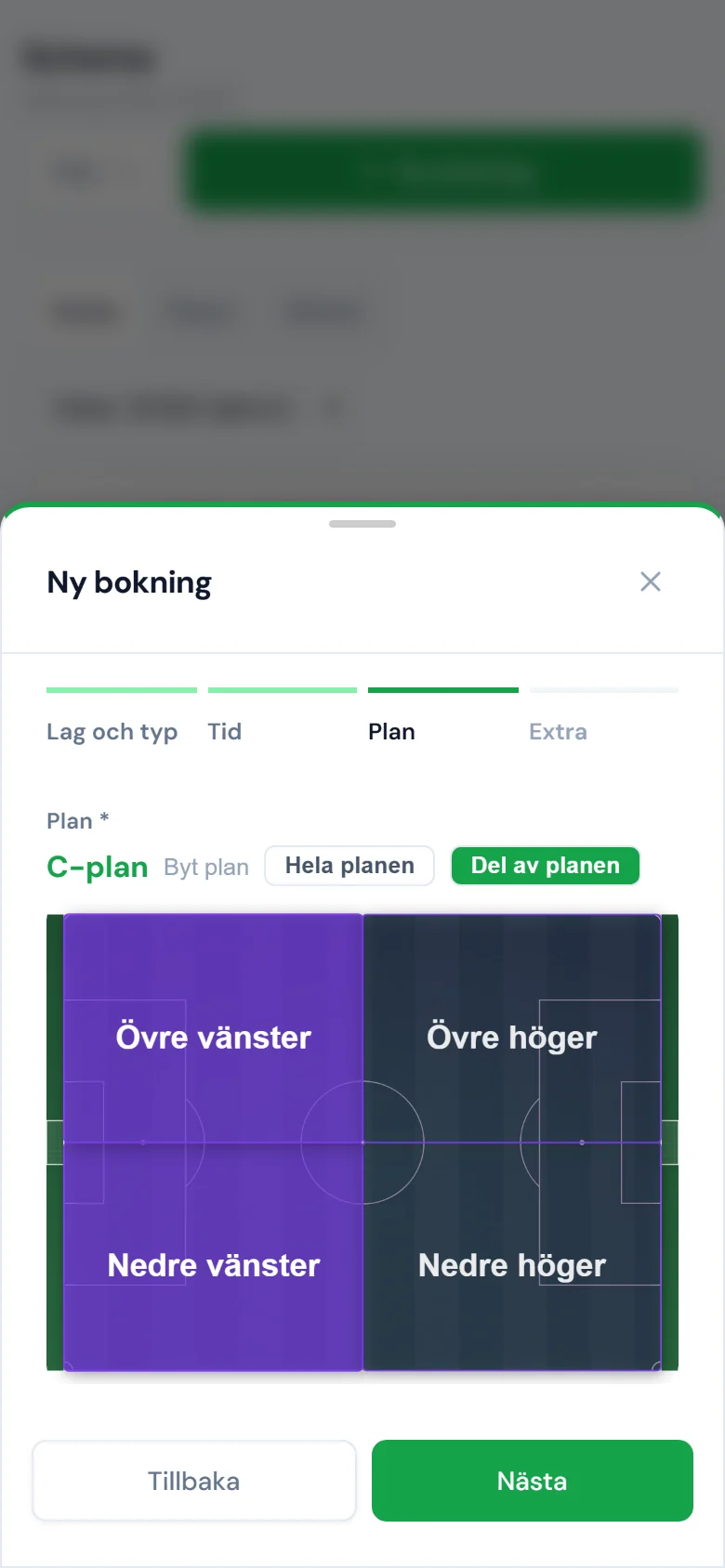
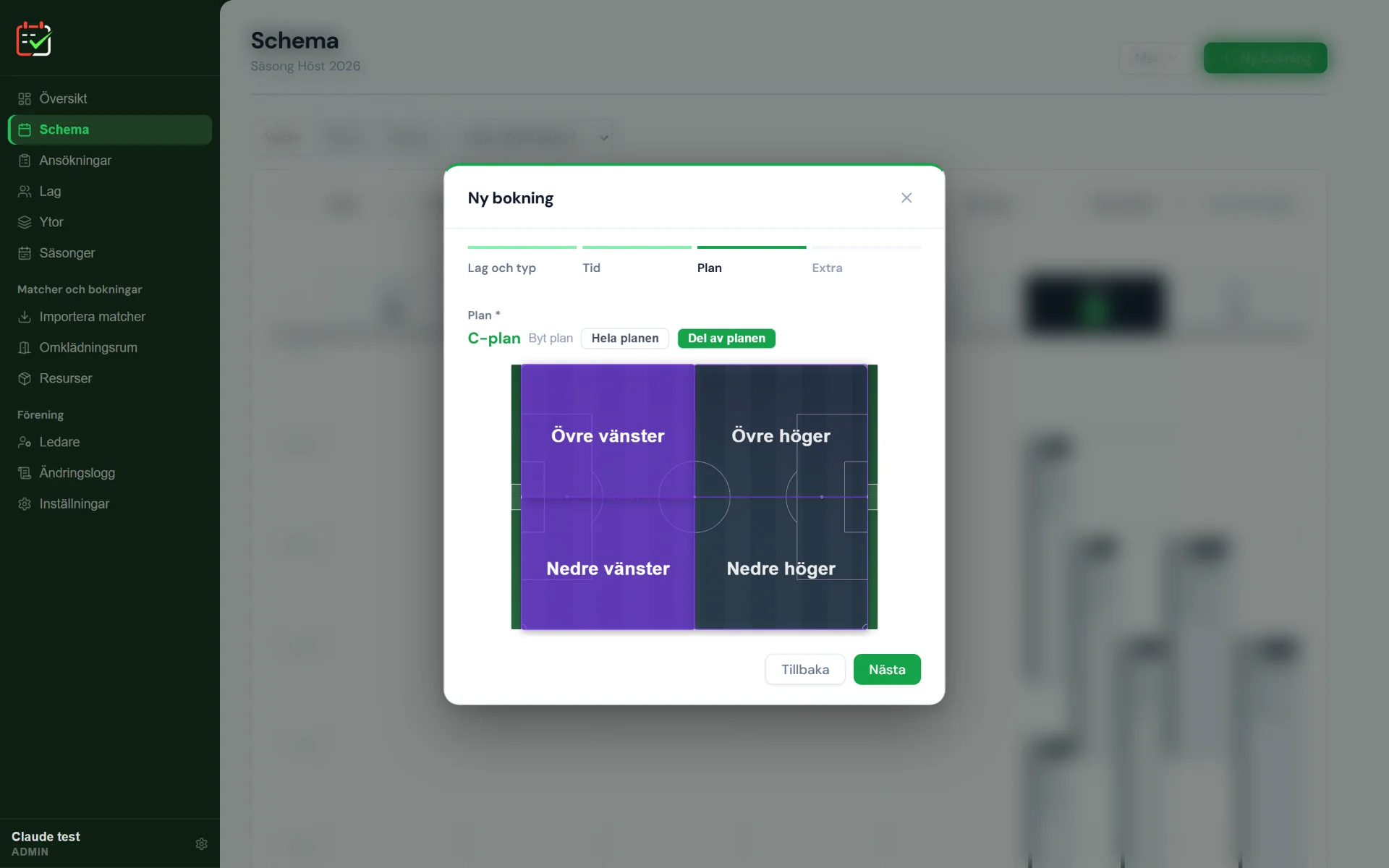
    The Pitch step in New booking (“Ny bokning”): pitch C with Part of the pitch selected and the upper-left and lower-left quarters marked.
  4. Follow the schedule

    Everyone sees the same schedule, on the computer, on the phone and in the calendar.

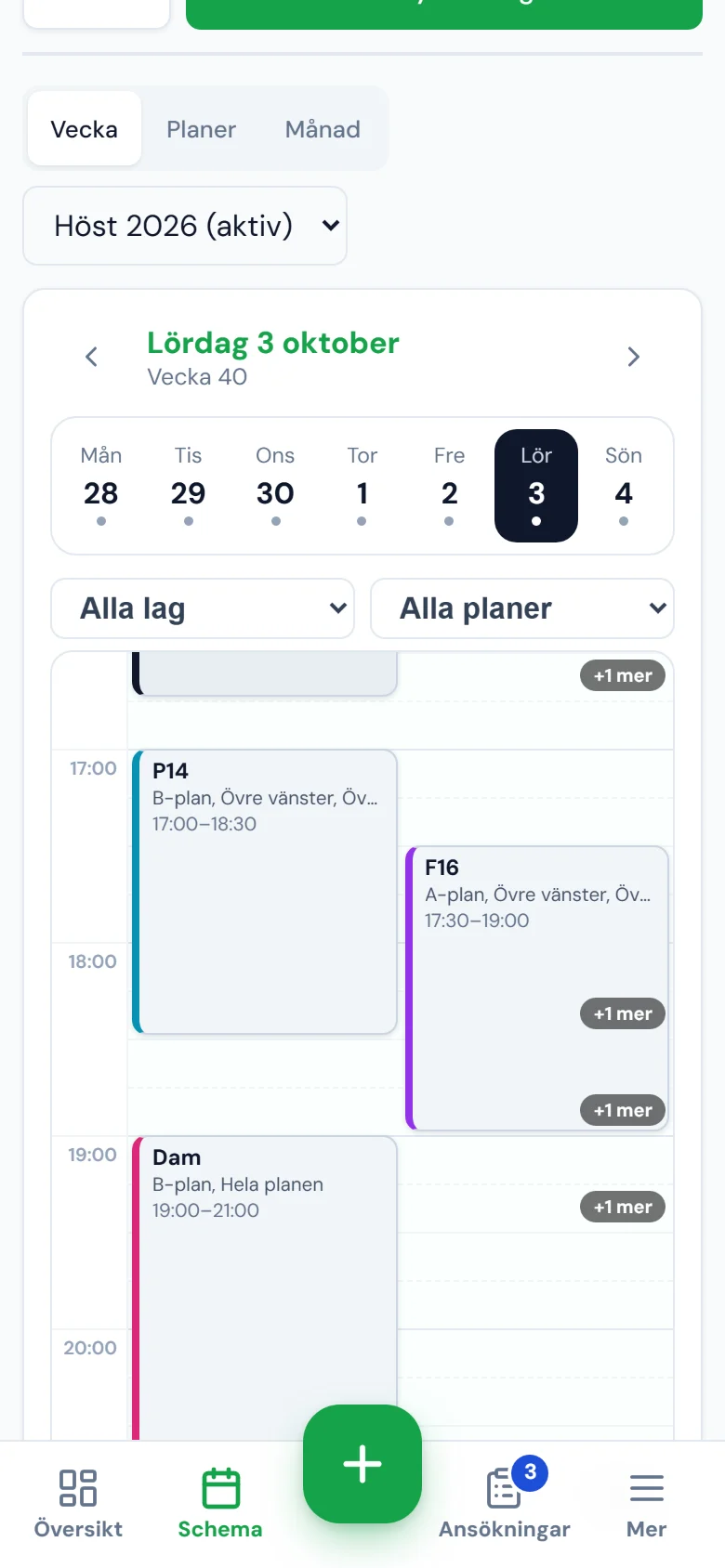
    The weekly schedule on a phone for Saturday 3 October, with P14, F16 and the women’s team as blocks on the timeline.

A real example: from application to finished booking.

  1. The team applies

    F10 applies for Wednesdays 17:00–18:00 on the small pitch for the whole season. The club office gets a notification.

  2. Planvra finds the clash

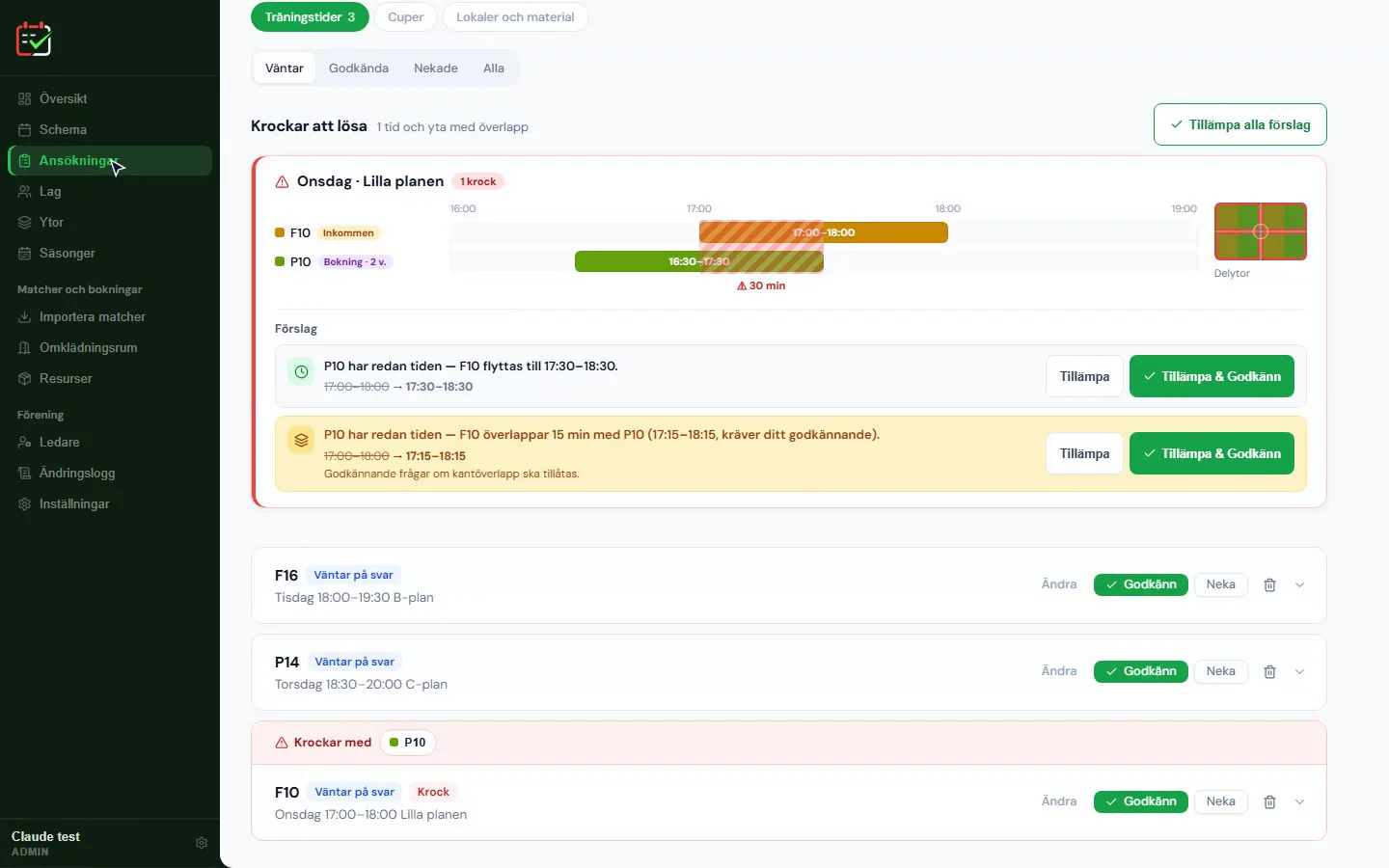
    P10 already trains there 16:30–17:30. Planvra shows the overlap and suggests moving F10 to 17:30–18:30, with a reason.

  3. The club office approves

    One click on “Apply and Approve” (“Tillämpa och Godkänn” in the app) creates bookings for the whole season. Weeks that still clash are skipped and shown.

  4. Everyone sees it at once

    Coaches get a push notification, and the training shows up in the schedule, in the team's view and on the club's public page.

Features

What Planvra does

Pitches, clashes, rooms, cups and the teams' own bookings in the same schedule.

Plan the pitch

Each pitch is split into quarters so that several teams can train at the same time. A match or a booking of the whole pitch takes the whole area.

  • Match formats per pitch: 11-a-side, 9-a-side, 7-a-side and 5-a-side
  • Away matches are entered without taking time on the home pitch
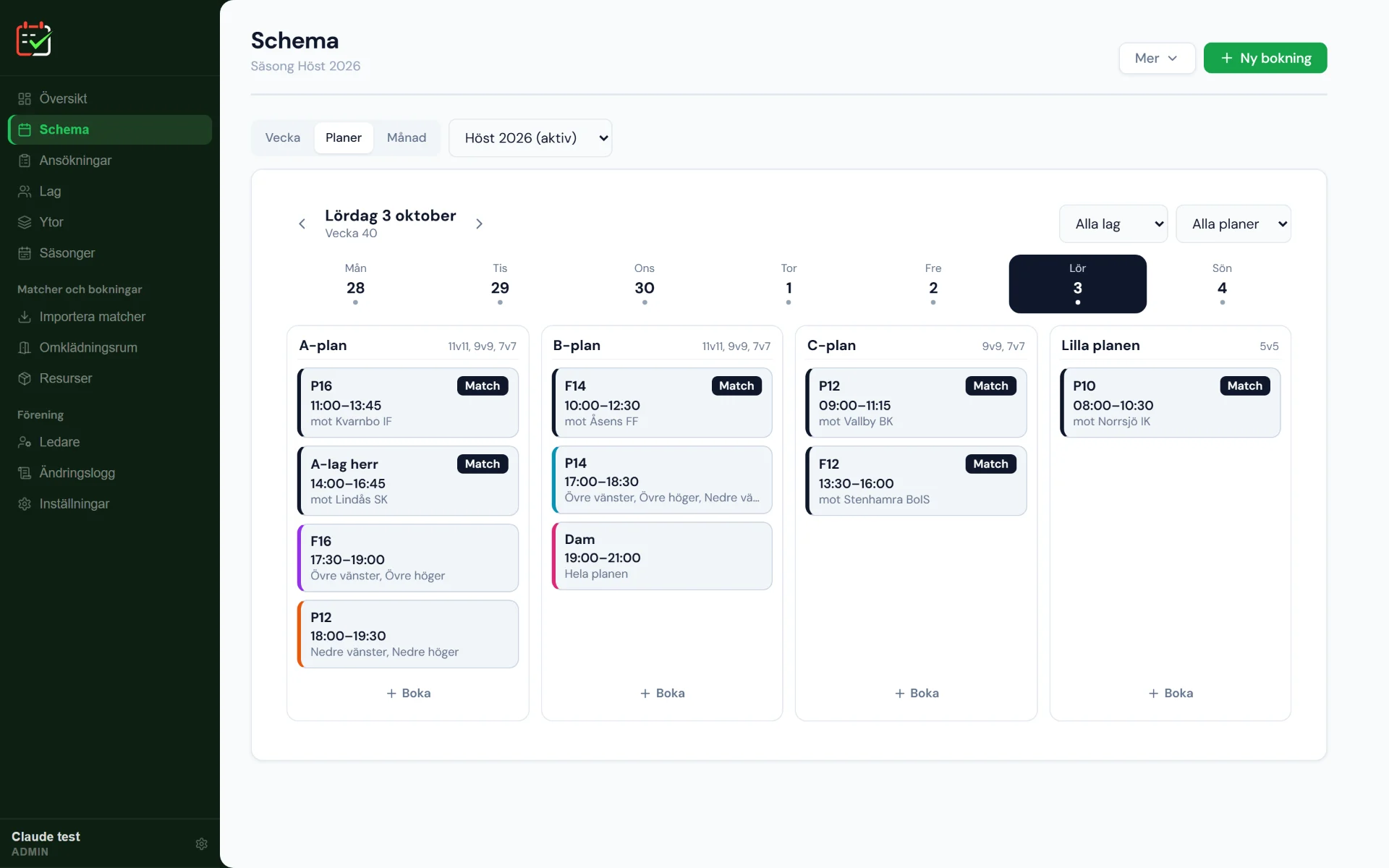
The Pitches view in the schedule (“Planer”): Saturday’s bookings per pitch, pitches A, B and C and the small pitch, with match formats and which quarters each team has.

The team itself

Coaches manage their team themselves on the phone, without emailing the club office.

  • Book: free times are booked directly, for example an extra training session
  • Apply: fixed slots for the season go to the club office for approval
  • Training, match or cup is chosen in the same flow
  • Push notification when an application is approved or denied
New booking on a phone: pitch C with Part of the pitch selected and the upper-left and lower-left quarters marked.

Clash checking

Every booking is checked against the pitch, the quarters, the match buffer and the team's own times before it is saved. If the system says no, it states who the booking clashes with, for example “The whole area is booked by Men's first team at that time”.

  • Different quarters at the same time are fine, the same quarter is not
  • Matches get time for warm-up before and cool-down after, 60 and 30 minutes by default
  • Two training sessions may overlap by at most 15 minutes at the start or end, but only if someone approves it
  • A team can never be in two places at once
  • Clashes between applications are shown with up to three suggestions: other quarters, another time, another pitch or a short overlap
The clash view in Applications (“Ansökningar” in the app): F10’s requested time overlaps P10’s training by 30 minutes, and Planvra suggests a new time with the Apply and Approve button.

Changing rooms and resources

A home match is more than a pitch. Planvra connects the match with rooms, equipment and facilities.

  • Rooms for home team, away team and referees, and one click fills in all matches
  • Room capacity is checked, and Planvra warns when rooms that share a shower are used at the same time by, for example, a women's and a men's team
  • Equipment is booked by quantity, so that no more is ever lent out than exists
  • Club facilities need the club office's approval when a team books
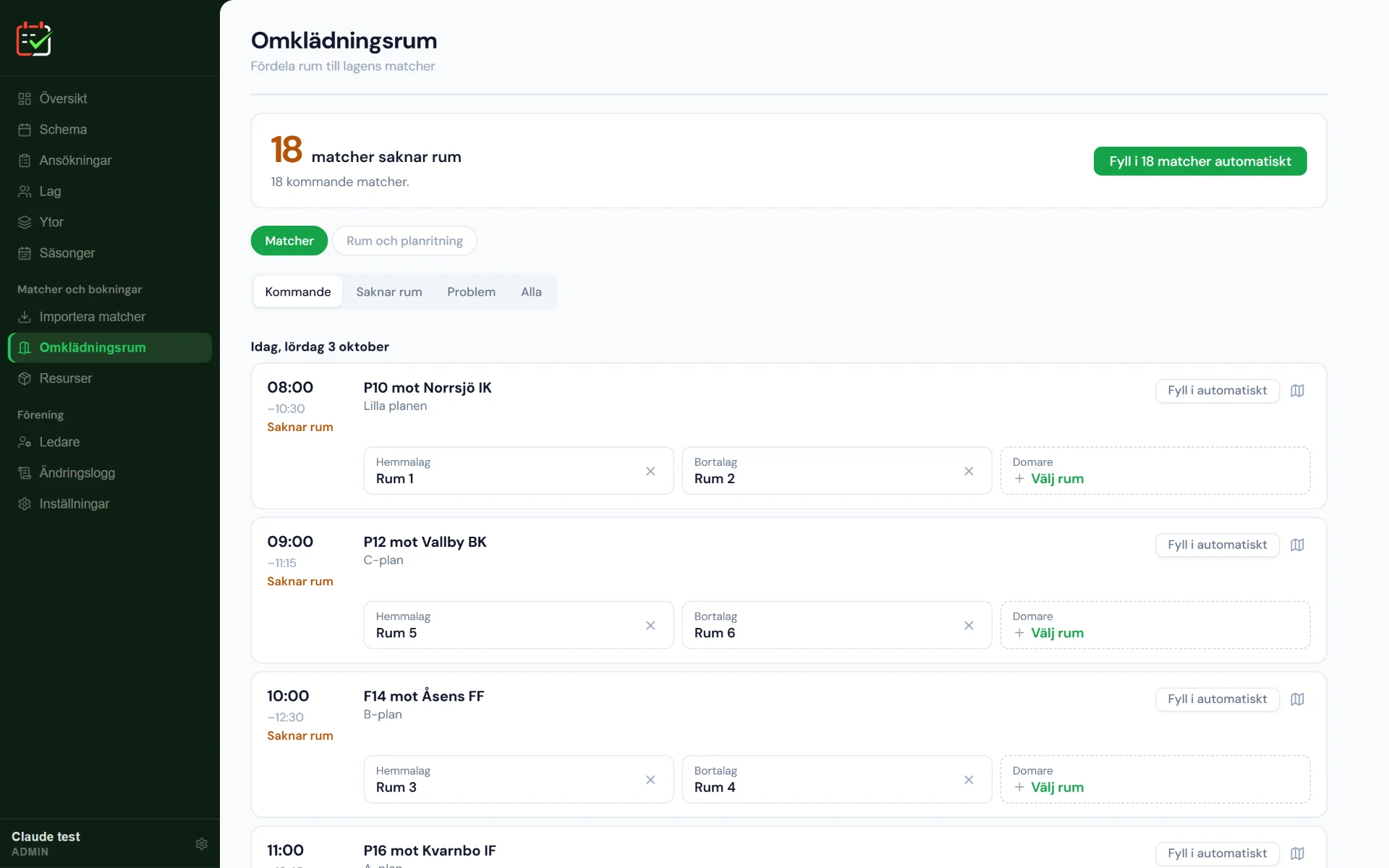
The Changing rooms view (“Omklädningsrum”): 18 matches lack rooms, and each match has fields for home team, away team and referee, for example rooms 1 and 2 for P10 against Norrsjö IK.

Public pitch status

  • Public page for parents and players with the schedule, current pitch status and maps, without logging in
  • Training time per team in hours, visible to the club
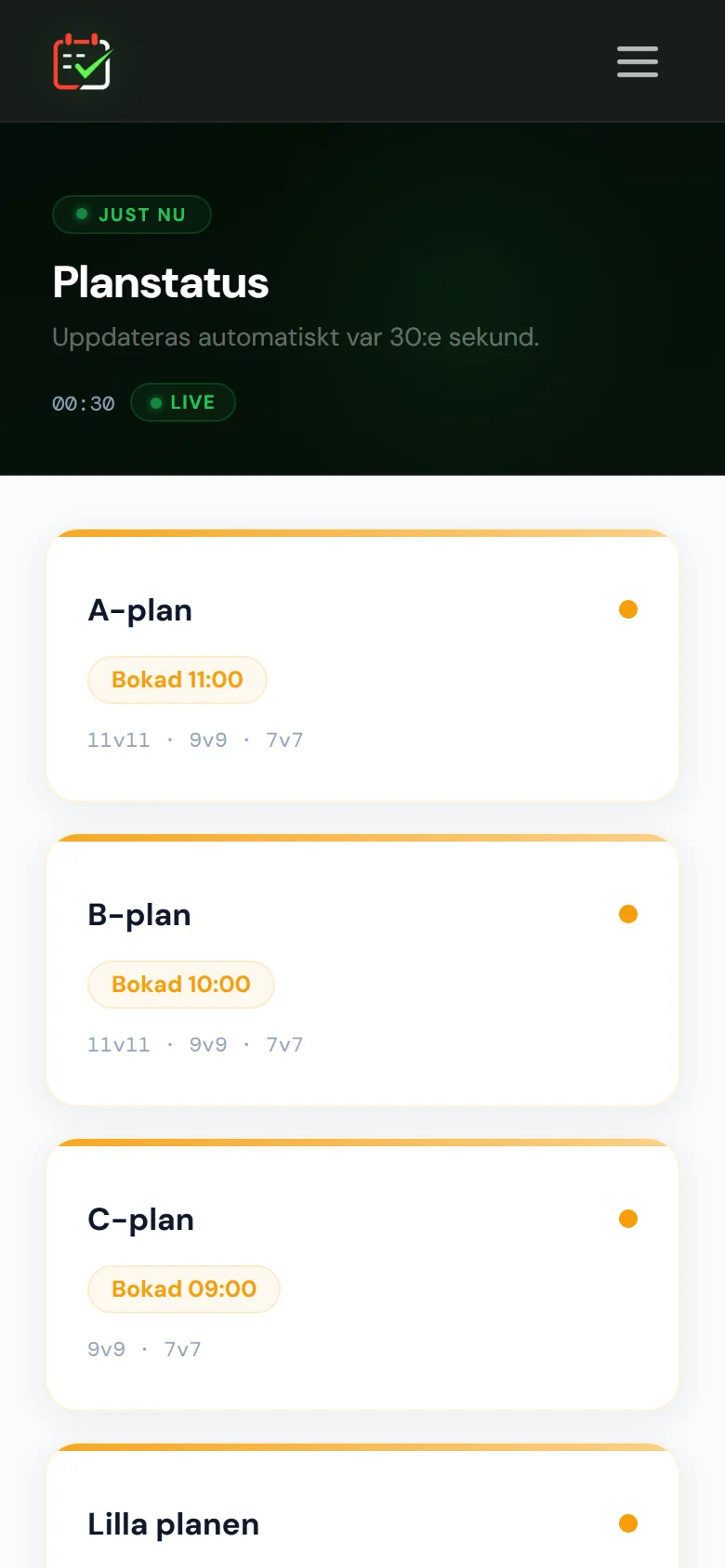
The public Pitch status page (“Planstatus”) on a phone: pitches A, B and C with the next booked time, updated every 30 seconds.

Follow the schedule

Everyone sees the same schedule, on the computer, on the phone and in their own calendar.

  • Matches are imported from the teams' calendars (webcal or iCal, for example from Svenskalag) or from a CSV file
  • The schedule can be exported to calendar apps
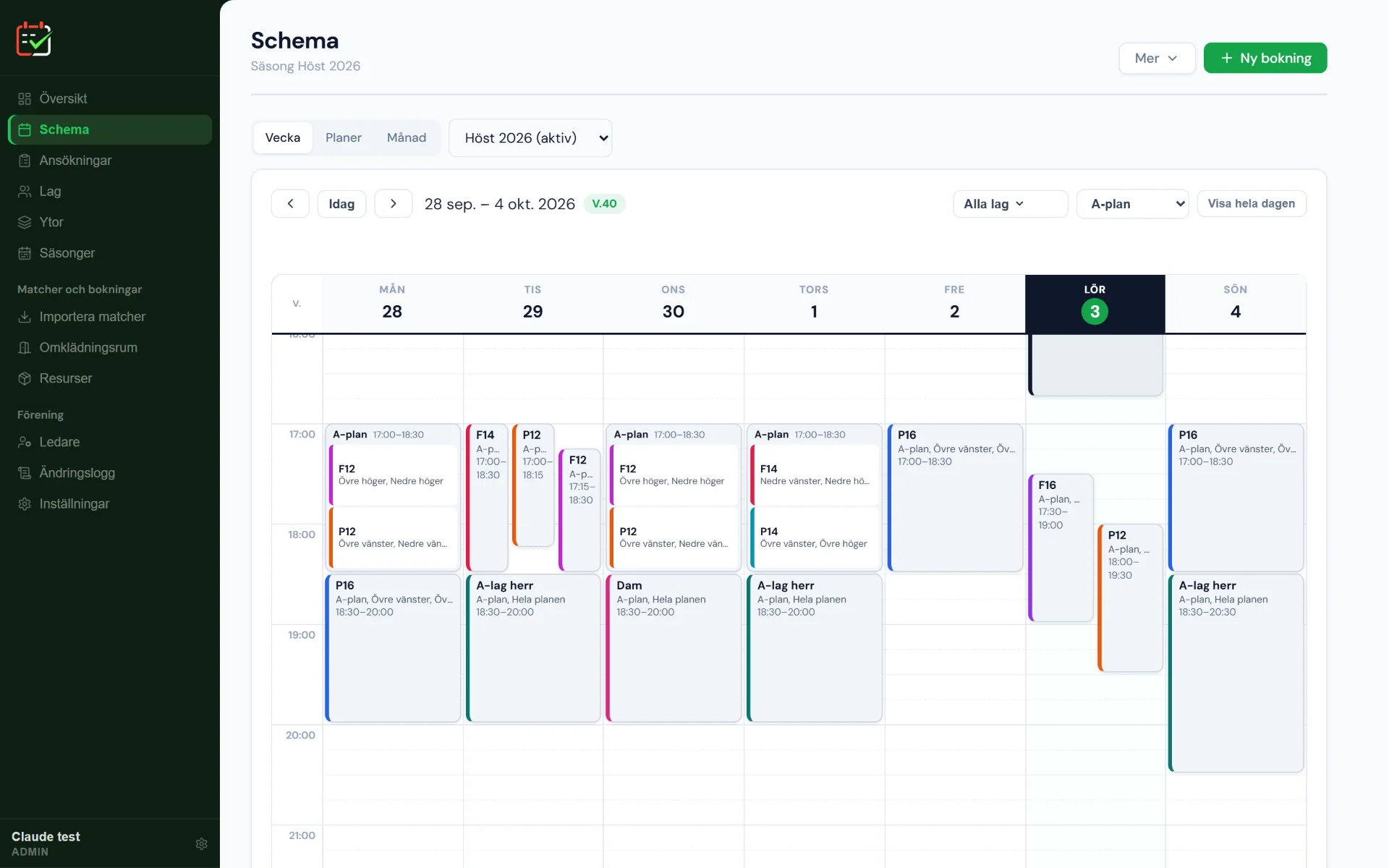
The weekly schedule for pitch A on the computer, with the teams' training sessions as coloured blocks per quarter.

Cups and tournaments

A cup takes several pitches during a day. It is entered as one booking, with its own times per pitch.

  • Several pitches and teams in the same cup, with changing rooms and equipment
  • Clash check against the regular schedule before the cup is approved
  • Coaches apply, the club office approves

Push notifications

Coaches get a push notification when something concerns the team, for example when an application is approved or denied.

  • Can be added to the home screen as an app, with notifications
  • No app to install: works on iPhone, Android and desktop

Season and recurring times

  • Seasons, and fixed slots that are booked for the whole season at once
  • Bookable hours per pitch and weekday, so that nobody books when the pitch is closed

Roles

The same schedule, three views

The club office and pitch managers

Administrators

  • Pitches, quarters, teams and seasons
  • Approves applications, cups and facilities
  • Overview of clashes and matches that lack a changing room
  • Invites coaches with a link

Coaches and team managers

Logged-in coaches

  • Book free times directly on the phone
  • Apply for fixed slots for the season
  • See at once whether a quarter is free
  • Get a notification when something concerns the team

Parents and players

The public page, no account

  • The club's schedule
  • Pitch status: what is happening right now
  • Maps of pitches and rooms

UF company

Planvra UF is a UF company in the Ung Företagsamhet programme.

Planvra UF is a UF company — a student-run company in the Ung Företagsamhet (Junior Achievement Sweden) programme. It is run during the school year 2026/27 and was started and is run by upper-secondary students in the Ung Företagsamhet educational programme.

The system is in real use: it was built for Sturefors IF, and other clubs can try it with a demo account.

Pricing

Prices coming soon

Prices are set together with the first clubs. The plan is one price per club, not per coach. In the meantime your club can try Planvra with a free demo account, using your real pitches and teams.

Apply for a demo

Getting started

  1. The club applies for a demo account at uf.planvra.se/ansok-om-demo.
  2. The club office enters the pitches, splits them into quarters and enters teams and season.
  3. Coaches are invited with a link and start booking or applying.

Questions

Frequently asked questions

What is Planvra?

Planvra is a scheduling and booking system for football clubs. It brings training, matches, pitches and changing rooms together in one place and finds the clashes before they become problems.

Who is behind Planvra?

Planvra UF, a UF company. It is run within Ung Företagsamhet during the school year 2026/27 by upper-secondary students. The system was first built for Sturefors IF and is open to other clubs.

Is Planvra a real company?

Yes. Planvra UF is a UF company, a student-run company started and run by upper-secondary students in the Ung Företagsamhet educational programme. The system is in live use by Sturefors IF, and other clubs can try it with a demo account.

How is Planvra different from an ordinary booking system?

A booking system answers whether a pitch is free. Planvra is built to lay out the whole club's schedule: it knows about quarters, match formats per pitch, match buffers and changing rooms, shows exactly which team a booking clashes with and suggests solutions when applications clash.

How does Planvra work?

The club office enters the pitches and splits them into quarters, enters teams and season and invites the coaches. Coaches book free times directly or apply for fixed slots. Clashes are shown with suggestions, the office approves, and the bookings are created for the whole season.

Do coaches have to install an app?

No. Planvra runs in the browser and can be added to the home screen as an app, with notifications. It works on iPhone, Android and desktop. The app itself is in Swedish.

How much does Planvra cost?

Prices are not set yet. The plan is one price per club, not per coach. In the meantime clubs can apply for a free demo account.

How does our club get started?

Apply for a demo account at uf.planvra.se/ansok-om-demo. Then the club office enters the pitches, splits them into quarters and enters teams and season. Coaches are invited with a link and can start booking or applying straight away.

How is the club's data handled?

Each club’s data is completely separate from other clubs’ data. Logged-in pages require an account and permission. The club can import matches from the teams’ calendars and export its schedule, and if the club leaves, its data is deleted in line with the GDPR. Read more in the privacy policy (in Swedish).

See what your schedule would look like in Planvra.

Log in if your club already uses Planvra, or apply for a free demo account.